쿠러미 프로젝트의 기능이 어느정도 구현이 완성이 되었다. 이제 성능 테스트를 통해 각 기능의 성능과, 실제 배포를 했을 시 예상되는 문제점들을 파악하려고 한다.
Ngrinder을 선택한 이유
실무에서도 쓰인다고 알고 있고, 한국어도 지원하고 Jmeter는 Xml방식이지만 Ngrinder는 Groovy 방식이라 쓸 줄 아는 언어가 java뿐인 나에게 잘 맞을 것 같아서이다.
또한, 번거롭게 설치할 필요 없이, 도커를 통해 실행 가능한 장점이 제일 큰 이유이다.
물론 Jmeter도 도커로 실행가능하지만 Gui형태는 설정이 복잡하다고 한다.
Docker - Compose.yml 구성
버전은 무조건 3.5.5-p1으로 해야한다. 그 외엔 모두 에러가 난다(알고싶지 않았다).
    controller:
      image: ngrinder/controller:3.5.5-p1
      restart: always
      ports:
        - "9000:80"
        - "16001:16001"
        - "12000-12009:12000-12009"
      volumes:
        - ./ngrinder-controller:/opt/ngrinder-controller
    agent:
      image: ngrinder/agent:3.5.5-p1
      restart: always
      links:
        - controller
Ngrinder 구조
컨트롤러(Controller)
컨트롤러는 nGrinder 시스템에서 사용자 인터페이스(UI)와 테스트 관리 기능을 제공합니다. 사용자는 컨트롤러를 통해 테스트 스크립트를 작성하고, 테스트를 시작하며, 테스트 결과를 수집하고 분석할 수 있습니다.
컨트롤러는 일반적으로 하나만 설치하며, AWS에서 EC2 인스턴스와 같은 가상 서버에 설치합니다. 컨트롤러에는 웹 서버와 데이터베이스가 포함되어 있어 웹 인터페이스를 통해 접근할 수 있습니다.
에이전트(Agent)
에이전트는 실제로 부하 테스트를 수행하는 역할을 합니다. 컨트롤러에 의해 조정되며, 컨트롤러부터 테스트 명령을 받아 대상 서버에 트래픽을 생성하고, 그 결과를 다시 컨트롤러에 보냅니다.
에이전트는 여러 대를 설치할 수 있으며, 각각은 AWS의 다른 EC2 인스턴스나 다른 지역의 인스턴스에 다양하게 설치할 수 있습니다. 이렇게 함으로써 테스트를 지리적으로 분산시켜 실제 사용자 환경을 더 잘 모방할 수 있도록 해줍니다.
정리하면 Ngrinder는 크게 Controller, Agent 두 가지로 구성되어 있으며 실제 트래픽은 Agent에서 발생시키고 그 Agent를 Controller에서 관리하고 테스트 결과를 보여줍니다.
출처: https://velog.io/@ktf1686/Spring-nGrinder-%EC%82%AC%EC%9A%A9%EB%B2%95-%EC%A0%95%EB%A6%AC
[Spring] nGrinder 사용법 정리
이번 글에서는 성능 테스트를 위한 도구인 nGrinder에 대해 알아볼까 합니다. nGrinder는 JMeter와 같은 부하 및 성능 테스트 도구의 일종입니다. JMeter와의 차이점은 JMeter는 단일 데스크톱 컴퓨터에서
velog.io
Ngrinder 성능 테스트

localhost:9000에 접속하여 ID, PW 모두 admin으로 접속하면 된다. 언어도 한국어로 설정 가능하다.
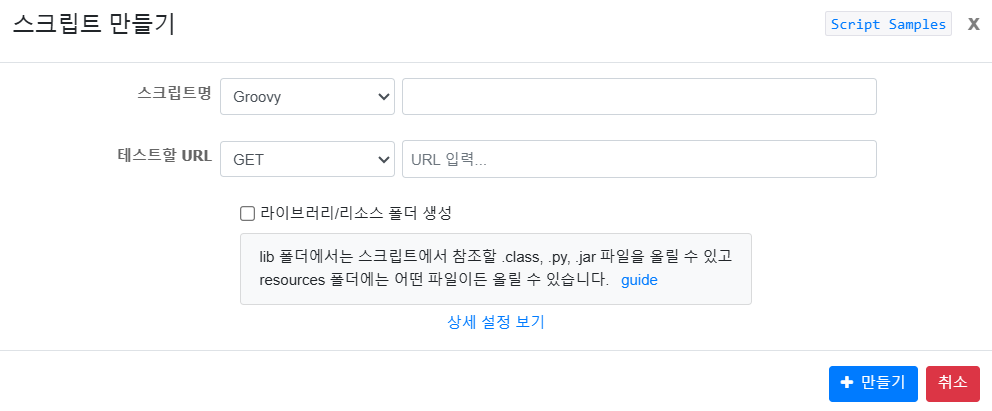
성능 테스트를 하기 위해서는 Groovy 스크립트를 생성해야 하는데,
GET http://[본인_local_ip_address]:[테스트 어플리케이션 port]/[테스트 하려는 경로] 를 작성하면 된다.
내 경우에는 도커로 Ngrinder를 실행하고, 어플리케이션은 로컬에서 실행시키기 때문에,
로컬 IP를 localhost나 127.0.0.1로 설정하면 도커의 localhost로 인식하기 때문에,
ipconfig에 나와있는 ipv4를 사용해야한다.
import static net.grinder.script.Grinder.grinder
import static org.junit.Assert.*
import static org.hamcrest.Matchers.*
import net.grinder.script.GTest
import net.grinder.script.Grinder
import net.grinder.scriptengine.groovy.junit.GrinderRunner
import net.grinder.scriptengine.groovy.junit.annotation.BeforeProcess
import net.grinder.scriptengine.groovy.junit.annotation.BeforeThread
// import static net.grinder.util.GrinderUtils.* // You can use this if you're using nGrinder after 3.2.3
import org.junit.Before
import org.junit.BeforeClass
import org.junit.Test
import org.junit.runner.RunWith

import org.ngrinder.http.HTTPRequest
import org.ngrinder.http.HTTPRequestControl
import org.ngrinder.http.HTTPResponse
import org.ngrinder.http.cookie.Cookie
import org.ngrinder.http.cookie.CookieManager
import groovy.json.JsonSlurper


/**
* A simple example using the HTTP plugin that shows the retrieval of a single page via HTTP.
*
* This script is automatically generated by ngrinder.
*
* @author admin
*/
@RunWith(GrinderRunner)
class TestRunner {

	public static GTest test
	public static HTTPRequest request
	public static Map<String, String> headers = [:]
	public static Map<String, Object> params = [:]
	public static List<Cookie> cookies = []
	private static final String BASE_URL = "172.29.97.118"
	//request에 담을 토큰 값 설정
	private static String token

	@BeforeProcess
	public static void beforeProcess() {
		HTTPRequestControl.setConnectionTimeout(300000)
		test = new GTest(1, BASE_URL)
		request = new HTTPRequest()


        HTTPResponse loginResponse = request.POST("http://"+BASE_URL+":8080/api/members", [studentId: "201901658", password: "abcd1234?"])

		// 응답 본문을 JSON으로 파싱하고, 'response' 필드를 token으로 사용
		def jsonResponse = new JsonSlurper().parseText(loginResponse.getBodyText())
		token = jsonResponse.response  // 로그인 응답에서 response 필드 값 추출


		// Set header data
		headers.put("Authorization", "Bearer "+token)
		grinder.logger.info("before process.")
	}

	@BeforeThread
	public void beforeThread() {
		test.record(this, "test")
		grinder.statistics.delayReports = true
		grinder.logger.info("before thread.")
	}

	@Before
	public void before() {
		request.setHeaders(headers)
		CookieManager.addCookies(cookies)
		grinder.logger.info("before. init headers and cookies")
	}

	@Test
	public void test() {
		HTTPResponse response = request.GET("http://"+ BASE_URL +":8080/api/markets?pageSize=10", params)

		if (response.statusCode == 301 || response.statusCode == 302) {
			grinder.logger.warn("Warning. The response may not be correct. The response code was {}.", response.statusCode)
		} else {
			assertThat(response.statusCode, is(200))
		}
	}
}
스크립트 코드는 자동으로 짜주지만,
static 변수로 ip를 설정해 ip를 한번만 바꾸도록 설정하고, @BeforeProcess에 로그인 요청을 실행해
따로 로그인을 한 뒤 토큰을 붙여줄 필요 없도록 코드를 추가했다.

성능 테스트 생성 시에 에이전트는 1만큼 한 뒤, 가상사용자의 수와 테스트 대상 서버에 ip또는 도메인을 적으면 된다.
그리고 테스트할 기간과 실행 횟수를 적은 뒤 실행하면 끝이다.
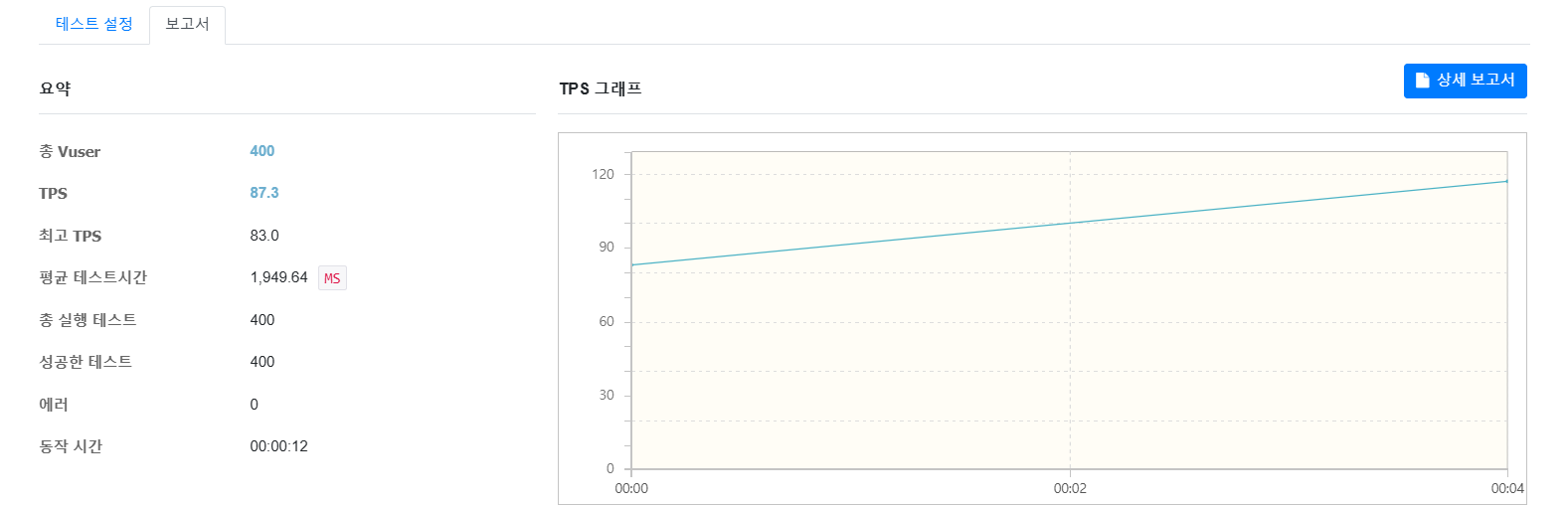
매장 조회 api를 테스트 했고, TPS는 대략 90이 나왔다. TPS는 Transaction Per Second로 초당 몇개의 작업을 처리하는 지 카운트 한다. 아직 데이터도 많이 들어있지 않은 상태인데도 이정도 TPS와 응답시간은 영 아닌 것 같다.
본격적으로 기능들을 리팩토링하고 쿼리 최적화를 해야겠다.
하지만, 간과한 게 있다. 테스트 어플리케이션과 부하테스트를 하는 Ngrinder가 같은 로컬에 존재한다.
이렇게 되면 같은 CPU,메모리와 같은 메트릭 자원을 사용하기 때문에 정확한 성능 테스트가 어렵다고 한다.
따라서 독립적인 환경을 만들어 테스트해야하는데, 나는 정확한 성능보단 기존 성능 대비 얼마나 개선이 가능한 지에 초점을 맞췄기 때문에 로컬에서 실행했다.
'쿠러미' 카테고리의 다른 글
| [쿠러미] FCM 구독, 알림 기능 개발 & 비동기 전환 (0) | 2025.03.31 |
|---|---|
| [쿠러미] Springboot +프로메테우스 + 그라파나 연동 (0) | 2025.03.19 |
| Mysql 프로시저로 더미데이터 생성 (0) | 2025.03.18 |
| Service, Repository 단위 테스트 도입 (0) | 2025.03.14 |
| LocalDateTime, DATETIME 불일치 해결 (0) | 2024.12.27 |
